
Have you ever been scrolling through TikTok and have you ever stopped and wondered how people are making those crazy realistic memes with their face on anyone! Well Viggle AI just turned this whole game around and I am here to tell you all about it.
Let me be honest with you – I’ve been playing around with this thing for weeks now, and it’s absolutely mind-blowing what you can do with just one photo and a few clicks.
Table of Contents
What Exactly Is Viggle AI?
Think of Viggle AI as your personal Hollywood studio, but way cheaper and infinitely more fun. It’s an AI-powered platform that enables you to create viral meme videos using motion capture technology, transforming any character image into an animated video.
Basically, you upload a picture of yourself (or anyone really), pick a video template, and boom – you’re suddenly dancing like a K-pop star or scoring goals like Messi. It’s like deepfakes, but way easier to use and actually legal.
The Real Magic Behind Viggle AI Motion Transfer
Here’s where things get interesting. Viggle uses motion transfer technology to animate still images based on user movements in uploaded videos, and can mask different characters over figures in existing videos.
And for you? This is the story of that embarrassing dance video your friend put up on the web. Now you‘ll be able to have your boss’ face there. (You know you want to.)
My First Experience With Viggle AI
I’ll never forget the first time I tried this thing. I was skeptical, obviously. Another AI tool promising the world, right? But then I uploaded a random selfie and picked one of their basketball templates.
Five minutes later, I’m watching myself dunk like LeBron James. My girlfriend literally spit out her coffee laughing.
That’s when I knew this wasn’t just another gimmicky app.
How Does Viggle AI Actually Work? (The Simple Breakdown)
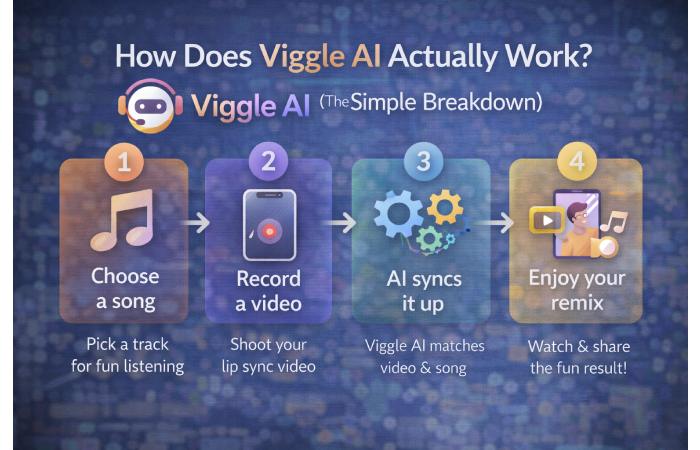
Here’s the thing – most AI tools are complicated as hell. Viggle AI? Not so much. Here’s how I use it:
Method 1: The Discord Route (Original Way)
- Join the Viggle Discord server
- Use the /animate command
- Upload your image
- Choose a motion template
- Wait for the magic to happen
Method 2: The Mobile App (Way Easier)
- Download the Viggle AI app
- Upload one image
- Pick from 5,000+ templates
- Hit generate
- Share your masterpiece
The app covers dance, NBA highlights, epic soccer moments, brainrot memes, and basically anything viral on the Internet. It’s like having access to every trending meme template ever created.
Viggle AI Features That Actually Matter
Let me break down what makes this AI meme generator actually useful:
🎭 Character Animation & Motion Capture
This is the bread and butter. You give it a photo, it gives you a movie star. The motion tracking is surprisingly smooth, and the facial expressions actually sync up pretty well.
🎪 Viggle LIVE: Real-Time Character Streaming
I was actually mind blown by this. I could just upload a picture of my avatar, switch on my webcam and start acting and it would mimic my facial expressions, my lip-sync and also my body language.
Perfect for:
- Streaming as your favorite character
- Creating content without showing your face
- Pranking your friends on video calls
🎬 5,000+ Viral Templates
Instead of creating everything from scratch, you get access to thousands of trending templates. Sports highlights, dance moves, movie scenes – it’s all there.
🎨 Mix Feature for Custom Animations
Want to use your own video as the motion template? The Mix feature lets you upload any video with apparent motion, and your character will copy those exact movements.
Viggle AI Pricing: What’s It Actually Cost?
Here’s the honest breakdown:
Free Tier:
- Basic meme generation
- Limited monthly credits
- Standard processing speed
- Watermarked videos
Paid Plans:
- More credits per month
- Faster processing
- No watermarks
- Priority support
I started with the free version to test it out, but honestly? I upgraded pretty quickly. The watermark removal alone was worth it for my content creation.
Real Talk: What Viggle AI Does Well (And What It Doesn’t)
The Good Stuff:
- Incredibly easy to use – My mom could figure this out
- Surprisingly realistic results – Way better than I expected
- Massive template library – Always fresh content to work with
- Fast processing – Most videos ready in under 5 minutes
- Multiple platforms – Discord, mobile app, web interface
The Not-So-Great:
- Quality can be inconsistent – Some results are perfect, others are… interesting
- Limited customization – You’re stuck with their templates mostly
- Background handling is wonky – Sometimes the background gets weird
- Face matching isn’t perfect – Works best with clear, front-facing photos
How I Use Viggle AI for Content Creation
Let me share some real examples of how this tool fits into my workflow:
Social Media Content
I create 3-4 memes per week for my Instagram. Instead of spending hours in video editing software, I just:
- Take a good selfie
- Pick trending templates
- Generate 10-15 variations
- Post the best ones
Client Work
I run a small social media agency, and Viggle AI has become my secret weapon for client content. Sports bars love the basketball and football templates. Fitness influencers go wild for the workout animations.
Just Having Fun
Sometimes you want to see yourself as a medieval knight or a dancing lobster. Don’t judge me.
Viggle AI vs Other AI Animation Tools
I’ve tried most of the AI video tools out there. Here’s how Viggle stacks up:
Runway ML: More professional, way more complicated. Pika Labs: Great quality, limited templates. Stable Video Diffusion: Powerful, requires technical knowledge. Viggle AI: Perfect balance of quality and simplicity
Tips for Getting Better Results With Viggle AI
After generating hundreds of memes, here’s what actually works:
Photo Selection:
- Utilize high resolution images (>512X512)
- Introduce Frontally/Flat-front images
- Good lighting makes a big impact,.
- Choose a photo with a simple background.
Template Choice:
- Match your body type to the template for better results
- Start with popular templates – they’re popular for a reason
- Check the motion complexity – simple movements look better
Processing Tips:
- Be patient – rushed jobs look rushed
- Try multiple variations – sometimes the third attempt is gold
- Use the fine-tuning options when available
The Future of Viggle AI and AI Meme Generation
Viggle is expanding into cinematic storytelling and building complete cinematic universes, which is pretty exciting. We’re probably looking at a future where anyone can create Hollywood-quality content from their phone.
The motion capture technology is getting better every month, and I expect we’ll see:
- Better face tracking and expressions
- More customization options
- Integration with other creative tools
- Improved background handling
Should You Try Viggle AI in 2024?
Here’s my honest recommendation:
Try it if you:
- Create social media content regularly
- Want to experiment with AI tools
- Need quick, engaging video content
- Don’t mind learning something new
Skip it if you:
- Need professional-grade video quality
- Want complete creative control
- Don’t create video content
- Are looking for traditional video editing
Getting Started With Viggle AI Today
Ready to dive in? Here’s your action plan:
- Start with the mobile app – it’s the easiest way to begin
- Use a clear, well-lit photo for your first attempt
- Pick a simple dance template to test the waters
- Don’t expect perfection on your first try
- Experiment with different templates to find what works
The learning curve is pretty gentle, and you’ll be creating viral-worthy content within your first session.
Final Thoughts: Viggle AI Is Changing How We Create
And look, I‘m not saying Viggle AI is flawless… But what it is doing, in a genuine way, is democratizing content creation. You don‘t have to own $10,000 worth of camera equipment or go to film school for a decade. You don‘t have to have a blockbuster budget anymore.
All you require are a good photograph and five minutes of free time.
Whether it‘s a content creator, small business, or simply an individual wanting to mess about with technology, Viggle AI delivers. It‘s easy to use, unbelievably powerful, and getting better every month.
On top of that, come on – is it not fantastic to witness yourself scoring the World Cup winner, even on AI? In a world that is at times, frankly, a drag, it’s refreshing to find that technology can also be utterly delightful with Viggle AI.